Did you know that in the Microsoft Cloud, there are dangerous roles and other security-related topics that you, as a customer, need to address? Sure, everyone knows, but not everyone takes it seriously. Securing your own tenant includes the issue of roles and permissions in Microsoft Enterprise ID (Azure AD) as a mandatory program. Some common mistakes in the real world include:
- Careless assignment of highly privileged roles
- Insecure custom roles
- Too many highly privileged accounts
- Poorly secured access points
- Inadequate password reset procedures
- Missing or insufficient logging and alerting
With over 90 “built-in” roles in Enterprise ID, it’s not easy to keep track. But Microsoft is here to help!
We’ve already explained the basics of securing a Microsoft tenant here and recently talked about using phishing-resistant authentication here. In this short post, we’ll focus specifically on roles in Azure AD and the help documents provided by Microsoft.
Privilege Escalation attacks using dangerous roles in Azure AD
Dangerous roles are not new. Specterops already warned in October 2021 about the misuse of roles and permissions in Azure AD, with a focus on Service Principals. However, it’s clear that even regular administrators and users can become targets of attacks and unintentionally grant extensive access to their own tenant and the data processed within it.
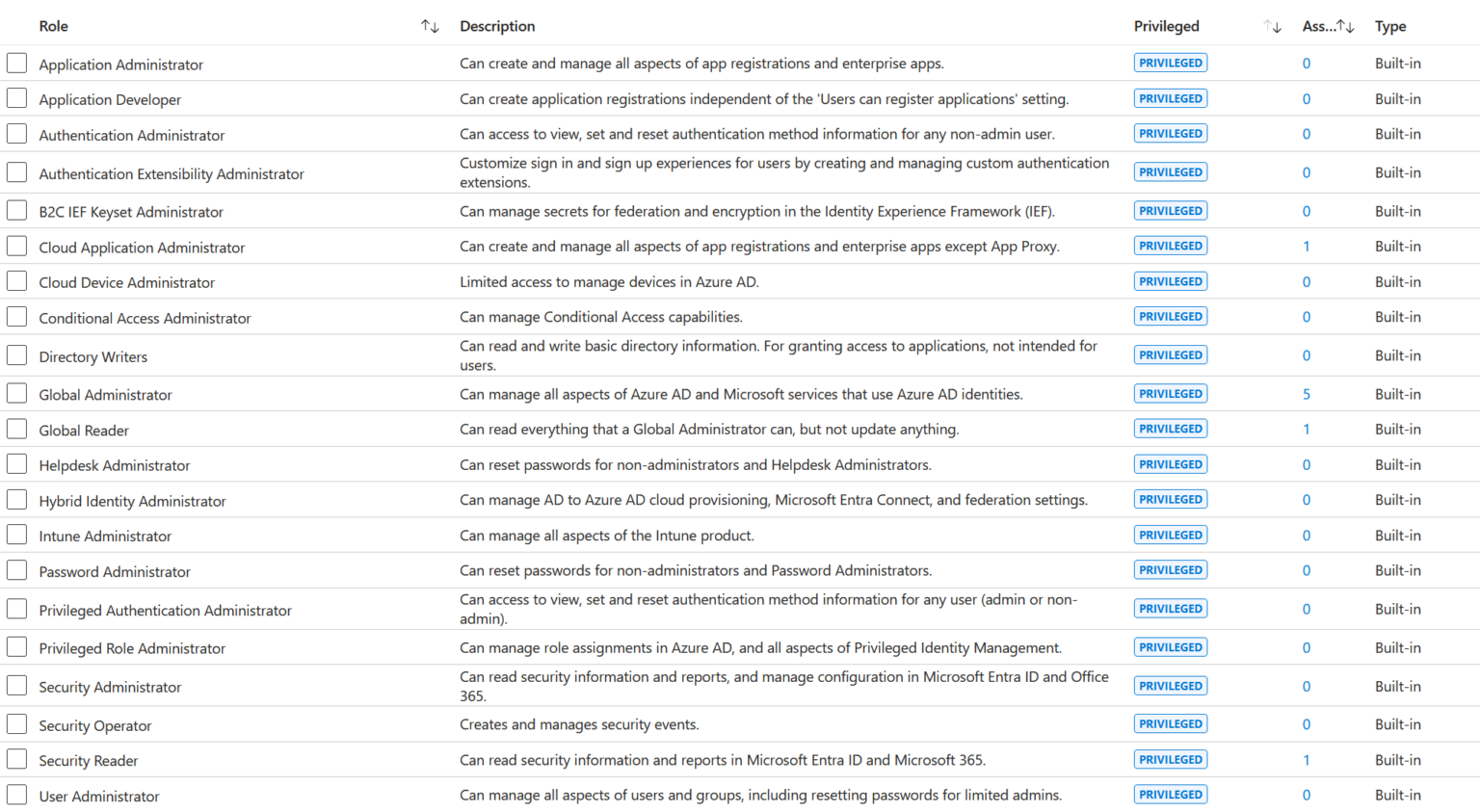
At the time of writing this post, Microsoft lists 21 privileged roles. The current implementation of Enterprise ID / Azure AD provides a quick overview of how many users have been assigned one of these roles. In the image on the left, for example, there are 5 instances of the Global Administrator and 1 instance of the Global Reader. This is a practical overview for getting started with role and permission checks.
It’s obvious that the “Global Administrator” is a privileged role. The “Application Administrator” also has the “Privileged” flag – rightfully so. One of the most popular examples of privilege escalation in the Microsoft Cloud is the abuse of the “Application Administrator” role. In Microsoft’s linked article, not only are the roles listed, but also the individual permissions and their criticality. This is particularly helpful when custom roles have been defined and assigned.
Enterprise Applications can also have extensive permissions within the tenant, such as “Directory.ReadWrite.All.” An attacker with control over such an app can freely navigate the tenant.

The aforementioned “Application Administrator” has the permission “microsoft.directory/applications/credentials/update,” which allows them to add new authentication credentials to an existing enterprise app. In plain terms, they can create a new client secret, use it to access the app, and abuse the “Directory.ReadWrite.All” permission of the app for their purposes. There are numerous ways to expand one’s own rights in the Microsoft 365 universe, just as in the on-premises world.
Least privileges – Roles and tasks
Properly assigning the necessary roles and permissions in Azure AD can be a challenge. Especially in the early days, roles often lacked individual permissions, leading to the definition of custom roles – a nightmare during audits. As Azure AD has matured, Microsoft has now provided useful recommendations for answering the question: Which role do I need in AAD for which task?
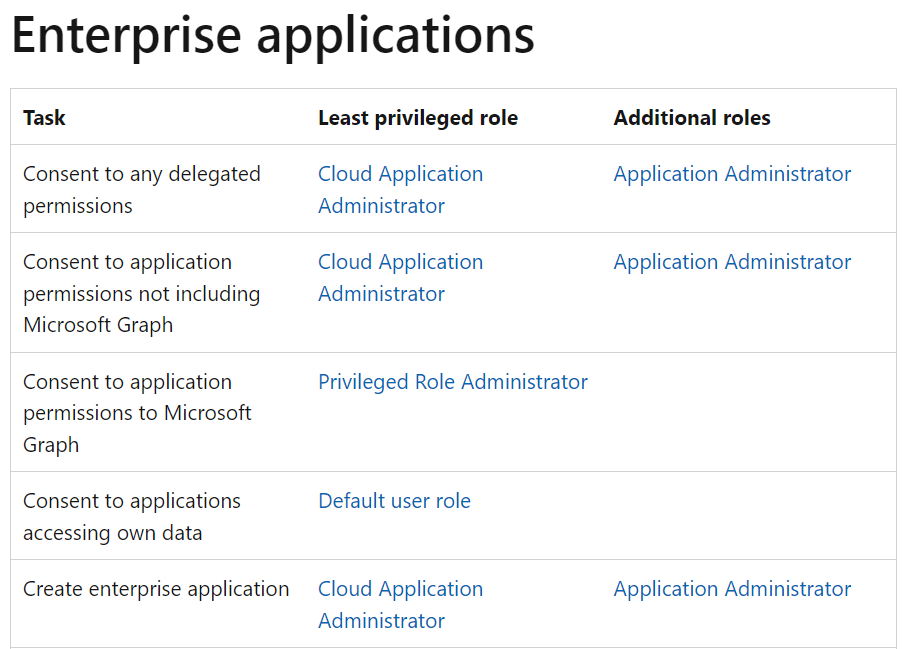
This prevents overprivileged users, but: For example, anyone wanting to create Enterprise Applications must naturally have the appropriate admin role: Enterprise Applications: Least Privilege Roles
At least, an Enterprise Application Admin doesn’t need the Global Admin role – well, as long as they don’t want to change user settings.
Regularly reviewing roles is worthwhile. When the number of critical roles is minimized, the attack surface in the tenant also decreases.
//Post translated using AI. Original post in germany can be found here.